
If you’ve ever wondered how Oracle APEX manages to turn a database table into a fully working web application in minutes, the answer isn’t magic — it’s architecture. Before you build your first page, it’s worth understanding what’s actually happening behind the scenes. This foundation will make every future concept — page rendering, session state, security — click faster.
Oracle APEX (Application Express) is a low-code development platform that runs inside the Oracle Database itself. This is the single most important fact to understand, and it’s what separates APEX from most other web frameworks you may have used.
There’s no separate application server running your business logic in a different language. Your application metadata — pages, regions, items, processes — is stored as data in database tables owned by the APEX engine. When a user requests a page, APEX reads that metadata, generates HTML/CSS/JavaScript on the fly, and sends it to the browser.
"Your application doesn't live in a folder — it lives as data, rendered live, every time someone asks for it."
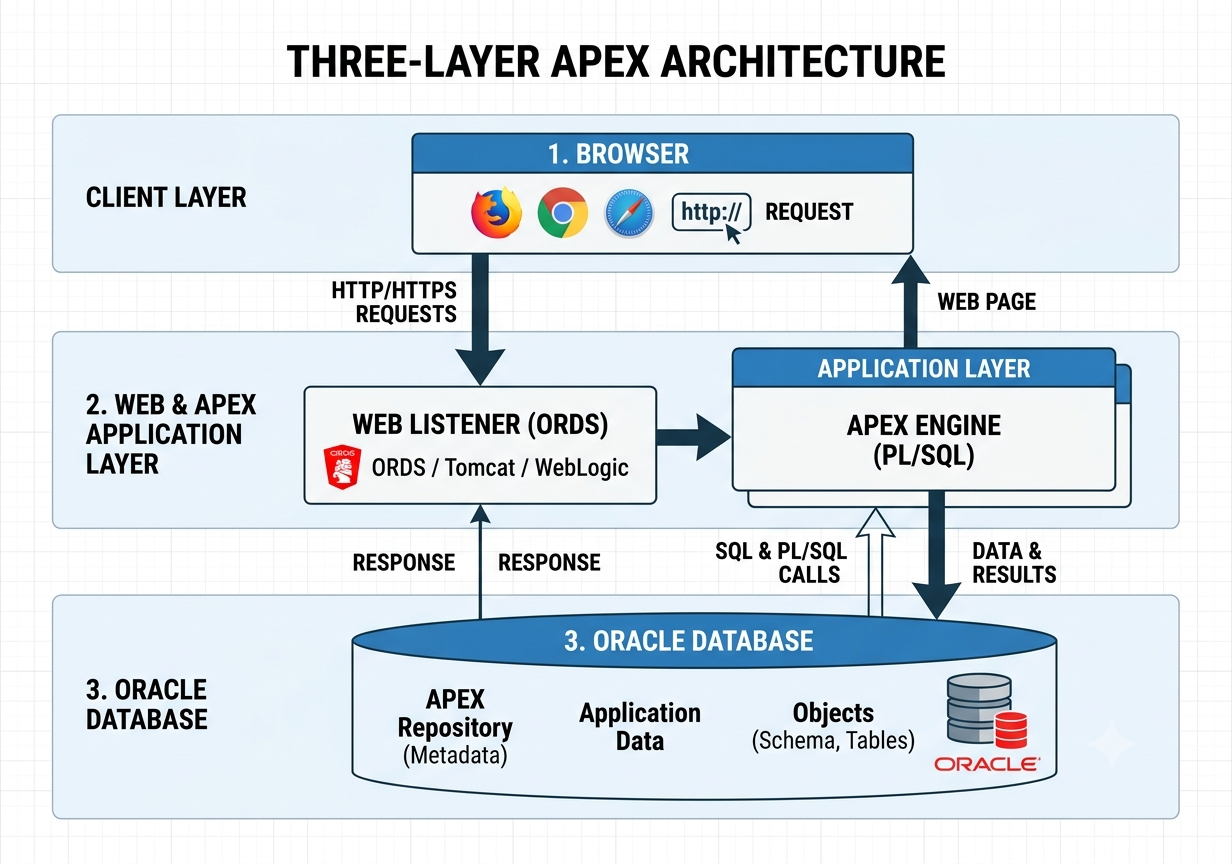
This changes everything about how you build. Your application is data — pages aren’t files sitting somewhere, they’re rows in APEX’s repository tables. Deployment becomes trivial: moving an app from dev to production is an export/import of metadata, not a file copy or a build pipeline. And PL/SQL becomes a first-class citizen, since the engine runs inside the database and any logic you write executes as close to your data as possible — no network round-trips to a separate app server.
Any APEX installation breaks down into three distinct layers. Understanding this now saves you confusion later, since almost every behavior you’ll encounter later in this series traces back to these three pieces working together.
The Oracle Database holds your actual application data — your tables, sequences, views — and the APEX engine’s own repository tables that store your app’s structure. Both live in the same database, often in different schemas.
The APEX Engine is Oracle’s own PL/SQL codebase that reads the metadata repository and renders it into a working application at runtime. You never edit this directly — it ships and updates with each APEX version (we’re working with 26.1 throughout this series).
The Web Listener is what actually talks to the browser over HTTP. Oracle gives you three real options here: ORDS (Oracle REST Data Services), the modern standard most new installs use; the Embedded PL/SQL Gateway, an older and simpler approach being phased out; and Apache/OHS with mod_plsql, the legacy method rarely used in new builds today. For any new project in 2026, ORDS is the right choice — it’s actively developed, supports REST natively, and is what Oracle recommends going forward.
Workspaces: How Multi-Tenancy Works From Day One
One detail that trips up developers coming from other platforms: APEX is multi-tenant by design, even on a single installation. A workspace is a logical container that isolates one team’s (or one client’s) applications, schemas, and users from everyone else’s on the same database.
This matters more than it might seem. If you’re building anything with a SaaS angle — multiple customers, multiple teams, or just separating dev/test/prod cleanly — workspaces give you that isolation without needing separate database instances. It’s a pattern baked into the platform from the ground up, not something bolted on later.
What’s Next
Next in the series: Workspace Management & Setup — where we’ll actually create a workspace, understand schema associations, and get you into the Application Builder for the first time.